Showing posts with label WP7. Show all posts

Tuesday, 2 April 2013

Smooth scrolling content on Windows Phone

     Gotta say that I am not 100% satisfied about the title of this blog post, but since I haven't found a better one I will use this one (don't get it wrong windows phone has smooth scrolling implemented). This post is focusing on how to smooth scroll the content of a ScrollViewer. If you are using the ScrollViewer you know that it already has the method ScrollToVerticalOffset that can be used to manually scroll the content but this method doesn't have any animation implemented so you will see only a fast redraw of the new content without getting the "feeling" that the content scrolled to the new position. The easiest way to achieve this task would be using a StoryBoard with an Animation on the property VerticalOffset of the ScrollViewer, but VerticalOffset is a read-only property so it cannot be set and therefore cannot be used for animation.
     The solution I found was to build a custom control and add a custom property that can be used as a target for a DoubleAnimation. The attached sample (see the link at the end of the post) is using a ListBox as the content of my Custom Control but you can use anything else inside the control (a better approach for the ListBox would be to create a custom control derived directly from ListBox and use the built-in ScrollViewer). 
      Let's start from the XAML part of the User Control:

  <ScrollViewer x:Name="scroller">  
<ContentPresenter Content="{Binding ContentArea, ElementName=userControl}"/>
</ScrollViewer>

    So we have a ScrollViewer which inside has a ContentPreseter that has its content binded to the control's property ContentArea. Now let us have a look at the .cs code.

 public static readonly DependencyProperty VerticalOffsetProperty = DependencyProperty.Register("VerticalOffset",  
typeof(double), typeof(SmoothScroller), new PropertyMetadata(VerticalOffsetPropertyChanged));
public double VerticalOffset
{
get { return (double)this.GetValue(VerticalOffsetProperty); }
set { this.SetValue(VerticalOffsetProperty, value); }
}
private static void VerticalOffsetPropertyChanged(object sender, DependencyPropertyChangedEventArgs args)
{
SmoothScroller cThis = sender as SmoothScroller;
cThis.scroller.ScrollToVerticalOffset((double)args.NewValue);
}
public static readonly DependencyProperty ContentAreaProperty = DependencyProperty.Register("ContentArea", typeof(object), typeof(SmoothScroller), null);
public object ContentArea
{
get { return (object)GetValue(ContentAreaProperty); }
set { SetValue(ContentAreaProperty, value); }
}

     The property that we will use for animation is the VerticalOffset that uses the method VerticalOffsetPropertyChanged to scroll to a vertical offset inside the control's scroller. The property VerticalOffset can be animated and we will use it to smooth scroll the ListBox content.
     Here is the content of the MainPage.xaml

  <uc:SmoothScroller x:Name="smoothScroller">  
<uc:SmoothScroller.ContentArea>
<ListBox x:Name="lstItems" ItemsSource="{Binding Items}" ScrollViewer.VerticalScrollBarVisibility="Disabled" ScrollViewer.HorizontalScrollBarVisibility="Disabled" ItemTemplate="{StaticResource DataTemplate}" >
<ListBox.ItemContainerStyle>
<Style TargetType="ListBoxItem">
<Setter Property="HorizontalContentAlignment" Value="Stretch"></Setter>
</Style>
</ListBox.ItemContainerStyle>
</ListBox>
</uc:SmoothScroller.ContentArea>
</uc:SmoothScroller>

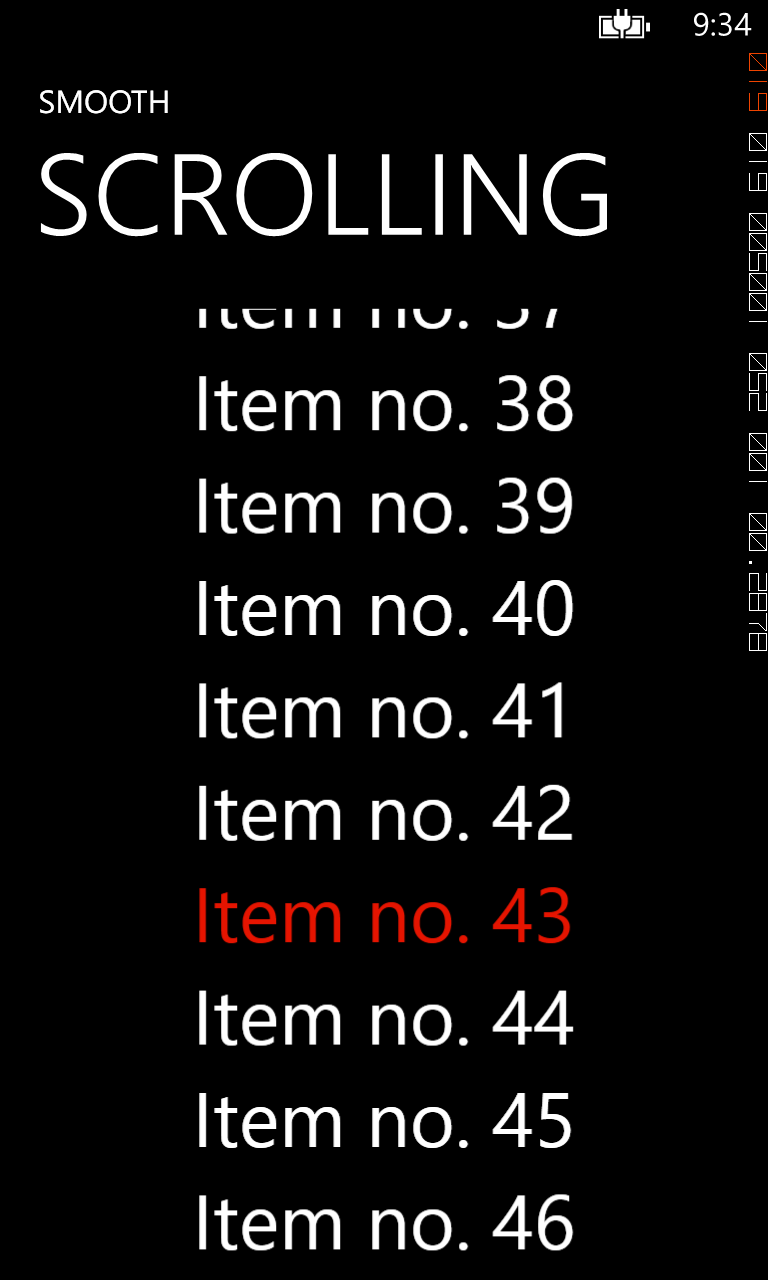
     So we have the SmoothScroller control which inside its ContentArea has a ListBox (the ListBox has it's scrollviewer disabled). What the sample does is it is changing the selected item every second (incrementing the selectedindex) and scrolls the content so that the newly SelectedItem is centered in the ScrollViewer. Here is the code used for scrolling:

  void dt_Tick(object sender, EventArgs e)  
{
((ListBox)smoothScroller.ContentArea).SelectedIndex = idx;
var container = ((ListBox)smoothScroller.ContentArea).ItemContainerGenerator.ContainerFromIndex(idx) as FrameworkElement;
var transform = container.TransformToVisual(smoothScroller.scroller);
var elementLocation = transform.Transform(new Point(0, 0));
double newVerticalOffset = elementLocation.Y + smoothScroller.scroller.VerticalOffset - smoothScroller.scroller.ActualHeight / 2 ;
//Animate transition
DoubleAnimation verticalAnimation = new DoubleAnimation();
verticalAnimation.From = smoothScroller.scroller.VerticalOffset;
verticalAnimation.To = newVerticalOffset;
verticalAnimation.Duration = new Duration(TimeSpan.FromMilliseconds(500));
var sb = new Storyboard();
sb.Children.Add(verticalAnimation);
Storyboard.SetTarget(verticalAnimation, smoothScroller);
Storyboard.SetTargetProperty(verticalAnimation, new PropertyPath(SmoothScroller.VerticalOffsetProperty));
sb.Begin();
idx++;
if (idx >= 56)
dt.Stop();
}

     Pretty basic: select the new index in the ListBox, calculate the new VerticalOffset so that the newly selected item is centered in our scrollviewer and create and start a 500ms animation for the SmoothScroller.VerticalOffsetProperty. Anyway I am sure that you will better understand how it works when you will try the sample code.
     The sample is far from perfect (before starting a new animation I should check if the old one finished, should not automatically scroll when the user is manipulating the list,...).
     Here is a screenshot from the sample:
As usual let me know if you need help. The code works on both Windows Phone 7.1 and Windows Phone 8 SDK.

SOURCE CODE


Tuesday, 5 February 2013

Update the HTC Mazaa to Windows Phone 7.8

 HTC Mazaa was the first ever Windows Phone to run the 7.5 build of the OS. It is a really great development device (as performance it is somewhere between the gen 1 devices and the gen 2 devices) but unfortunately it haven't received any updates since the RTM release build 7.10.7720.68. If you still have RTM build on it you will probably see that you are not even able to access the Store anymore. The bad news is that it will not receive any automatic updates but if you want you can still manually update it to the Windows Phone 7.8 version on it.
   To manually update the device you will need :
  1. Zune 4.8 final (build 4.8.2345.0)
  2. Download the WP7_update_tool.rar and install the UpdateWP package for your platform (x86 or x64). This is version 4.8.2134.0. You can download the Update tool from this post
   What you will need to do is simulate the steps that Zune does when it updates your phone. At each step there are a number of cab that you can send to the phone at the same time. BACKUP YOUR PHONE before updating. This tutorial starts the update from the version 7.10.7720.68 up to 7.10.8858.136. If you have a heigher version than 7.10.7720.68 just start from the step of the version you have. We assume that your Mazaa has the following language packs installed (if you have less just remove the corresponding cabs from each step):
  • German (0407)
  • English - United States (0409)
  • French (040C)
  • Italian (0410)
  • English - United Kingdom (0809)
  • Spanish (0C0A)
   At each step just run:
 updatewp /iu [concatenate cab's from step here with space between]

Here are the cabs for each step:

1) 7.10.7720.68-7.10.7740.16

2) 7.10.7740.16-7.10.8107.79


3) 7.10.8107.79-7.10.8112.7

4) 7.10.8112.7-7.10.8773.98


5) 7.10.8773.98-7.10.8779.8 

6) 7.10.8779.8-7.10.8783.12

7) 7.10.8783.12-7.10.8858.136

If you have problems updating please let me know.

BTW I am not responsible if you BRICK your phone :) . Here is mine updated:


NAMASTE

Sunday, 1 January 2012

The need for a different Marketplace

My grandmother always said that in the first day of a new year you should do what you would like to do the rest of the year. Even if the last year I didn't had a lot of time to blog I always wanted to so here I am wanting to start the year with my blog.
So what is wrong with the current version of the Marketplace? I could say nothing really, but there is so much that could be improved/changed. I am referring here to the marketplace of all major mobile platforms: Android, iOS and Windows Phone. They are more or less the same. Right now I have experience as a developer with Windows Phone marketplace and as a customer/consumer with all three of them. The marketplace was/is one of the greatest marketing/selling instrument in the software industry. In theory it gives the opportunity to everyone to sell their ideas/software all over the world. I say in theory because it enables developers to do that, but it doesn't make it easy.
One of the biggest problems I see for the moment is the number of applications. I am looking at the Microsoft "race" to catch up with the number of applications in the marketplace. In this race the number is the priority and the quality comes second. The result of this race is that the marketplace get filled with "junk". It is the same situation on all the three platforms, but today the analysts judge the success of a platform by the number of apps in the marketplace. Let's face it there are 500.000 application in the Apple marketplace and, maybe, not even 10% are quality apps. When I say junk I say applications that don't bring any innovation, written as fast as possible and thrown into the wild just to have an application out there. From my experience (I have a small application in the marketplace) in order to have a decent application there is a lot of work to be done in developing and maintaining it. Having so many applications in the marketplace "kills" the opportunity marketplace gives you if you have a quality app because it makes it almost invisible. If today you have a quality app and you publish it will be there with (I will take the Windows Phone marketplace numbers published by http://wp7applist.com/en-US/stats/ today 01.01.2012) other 451 applications published the same day. Does you application stand any chance? Some will say yes, I would say the more apps are in the marketplace the harder will be. You can only count on the people that are trying new applications. So inevitable a quality app will go down (maybe a little bit slower ) with the others and you have to find other methods to get it "visible". Another consequence of having a lot of applications published every day without a quality check is the degrade in the service offered to developers. I remember that when I wrote this post: http://sviluppomobile.blogspot.com/2011/01/windows-phone-marketplace-more.html the quality of certification the service was great. Things changed a little in the last two months (I think they had an increase in the number of applications to certify) the certification time jumped from two days to more than a week. More frustrating is seeing applications like this one published in "bulk":


So is it worth having thousands of applications without any quality filter (just rules on how to write your app)? I would prefer a quality marketplace, but maybe having both is better. It's like when you go to the market to shop: if you want products that cost less you go in one place, if you want quality products you go to another shop, if you just need one product you go in the first shop you find. The marketplace in the marketplace could improve a little bit on the quality part. It would need quality reviewers that would select the apps for the "quality" marketplace. It is easier than to go on all review websites and look for top applications on each platform. A place in the marketplace where you go when you don't know what you really want but you would like to try some quality applications. Apple, Google and Microsoft should not be the quality reviewers but continue to do what they do and then the best reviewers/websites on each platform should intersect their chosen applications (easy to say and hard to do). It is not a bullet proof mechanism.
Other suggestion regards the reviews specifically bad reviews. In this moment if you want to make a concurrent application go down you just go and slowly start to make bad reviews in all the marketplaces. (it is a situation I am dealing with). I would suggest that, if someone makes a bad review and give one or two stars, he should be "forced" to write a reason. This should help the developers understand the problem, and, if it's not true at least ask the review to be removed. Also the reviews should be disabled when the application is hidden. For the hidden applications the reviews don't make any sense.
Being able to publish a beta version of the application in the marketplace is an awesome feature, but in this moment, for me is almost useless. You have to find your beta testers, but it is a difficult task. So there should be an "open" beta option. This way anybody that wants to test the beta and has a link to it can do it with a limit of 100 users (more or less like the hidden apps but limited to a number of users).
In my opinion 2011 was a great year for Windows Phone even if the market shares don't reflect it . The 7.5 version is a great step forward and I hope that 2012 will bring us another big step. I still think that the application list is "ugly" and not really usable, we need some way to group applications (maybe an evolution of the "folder" concept).
I really hope Microsoft will make Apollo an EVOLUTION and not a REVOLUTION.

Happy New Year to all my readers! A better year to everyone.

NAMASTE

Wednesday, 26 October 2011

WP7 A better InkPresenter using XNA

  Last week I was at SMAU Italia  together with Matteo Pagani giving a hand at Windows Phone 7 labs and having a good time with my friends at Microsoft. I also got the pleasure to meet Ben Riga. One of the attendees at the laboratory raised a really good question about the performance of the InkPresenter in WP7. He is using the control to capture a signature, but if you are pretty fast (usually people when they do their signature are fast) the result is "ugly" and not really usable. You won't get a smooth curve, but something like this:


 This screenshot is taken in the emulator, but on the real device the curve looks worst and it's easy to reproduce this behavior. I took this "problem" as a challenge (two nights of work and now the third to write the post) convinced that I can get better results with a mix between XNA and Silverlight, mix that in Mango is possible. T
 The main problem is the number of points returned by the event MouseMove of the InkPresenter control which is not enough points to draw a decent curve.
  The first thing I've tried in the XNA version was to use the TouchPanel.GetState() but I was surprised to see that I get the same number of sampling points as the MouseMove in InkPresenter. The things improved a lot when I've used TouchPanel.ReadGesture() with GestureType.FreeDrag. Using these sampling points as StylusPoints for the InkPresenter the situation improved a little:


 The black line is the one obtained with MouseMove and the red one is the one obtained with ReadGesture.The result is better, but not satisfying. The only way to further improve the result was to manually draw the curve without InkPresenter. I've have used BezierSegment to draw the curve. Without any processing this would be the result:


The new curve is the blue one which is better than the others, but it is still not smooth in some points. This is because a Bézier path is smooth if each endpoint and its two surrounding control points lie in a straight line. In other words, the two tangents at each Bézier endpoint are parallel.


There is more than one approach to solve this behavior and I've implemented two (with all the mathematics I felt back at the University http://en.wikipedia.org/wiki/B%C3%A9zier_curve). 

The first is an algorithm for Automatically Fitting Digitized Curves with the Douglas Peucker algorithm to reduce the number of points (http://stackoverflow.com/questions/5525665/smoothing-a-hand-drawn-curve).

The second one uses Bézier splines which creates the First and Second control points for each Bézier segment http://www.codeproject.com/KB/graphics/BezierSpline.aspx . 

With both algorithms the results are pretty good:


If you are interested to play with the sample you can change the following parameters:

double PhilipSchneiderTolerance = 0;
double PhilipSchneiderError = 4;
-used when the fitting algorithm is PhilipSchneider (run this sample http://cid-c27e99281f78a67a.office.live.com/self.aspx/Public/Simplify.zip on the desktop to understand what changes when you change the Tolerance and the Error)

 private bool _showPoints = false;
-shows or hides the points read by ReadGesture
        
private bool _showOtherCurves = false;
-shows or hides the InkPresenter curve using MouseMove and ReadGesture

private FitCurveAlgorithm _algorithm = FitCurveAlgorithm.PhilipSchneider;
-changes the fitting algorithm: None, BezierSpline, PhilipSchneider


P.S. The project still needs some working/polishing in order to be used in production, but that is the simple part so... HAVE FUN

NAMASTE

Thursday, 1 September 2011

Mobile HTML5 Speed Reading Again

 Today I've upgrade my iPad 2 to iOS beta 7 and I was thinking that a more "realistic" comparison for the HTML5 Mobile Speed reading would with the new iPhone compared to a new Windows Phone Mango device (new year new hardware). On my Omnia 7 with 7712 build and video drivers not optimized for Mango I get around 30fps, the same that I was getting on my iPhone 4 with iOs5 beta. I remember that on a tweet I read that, on some devices, Windows Phone 7.5 Mango was doing 60 fps. On the other hand the new iPhone will probable have the A5 processor just like the iPad2 so I've run the same test on my device and the results are not bad at all. The iPad2 with iOs5 beta 7 is doing a stable 60fps. This is the frame rate we can expect from the new iPhone.So Apple and Microsoft are, for now, at the same level and let's hope that the OEM's will optimize their video drivers for Mango in order to get 60 fps, if not it could be a boomerang for Microsoft (the new iPhone, doing 60fps, would smash WP7 Mango that is doing 30-40fps). Hope it won't happen.

Here is the test on the iPad2

NAMASTE

Thursday, 25 August 2011

Where XNA beats up Silverlight

   Finally a blog post. I am in the process of updating (it's more of a rewriting) Boxfiles for Mango. Till now I have rewritten the Dropbox library from scratch (took off all the dependencies Hammock, Json.Net and now it's pure HttpWebRequest) and developed a library for accessing Skydrive resources (it works and it is possible to list the folders and download the files mainly what I need to get the modified Office files back to Dropbox). Anyway the Skydrive API it's a mess for the moment and I really hope they will get a "clean" API. The current version of the Rest Api is usable only for contacts, photos and videos. I will post both libraries on Codeplex (very probable after I finish the update of Boxfiles). 
    So what is this post all about. One of the features of the new version of Boxfiles will be pinch to zoom. Searching on the web I have found the XNA and the Silverlight solutions. I've started with Silverlight and with pinch to zoom added the application would easily eat more than 90MB of RAM while the image window is opened.  Digging up on what was consuming so much memory it turned up that the image window eats around 40 MB of memory (also because I have enabled CacheMode="BitmapCache" in order to have a smooth zoom). This is an abomination for a simple page with one menu and an Image control displaying a file  of 3MB. I than remembered that, in Mango, Silverlight and Xna can "live" together. The feature was introduced for enabling Silverlight in Xna (menus and stuff) , but in this particular case I will use Xna in Silverlight. I've created a project where I can compare the pinch to zoom on both Xna and Silverlight. The results are not bad: XNA uses around 10MB while Silverlight uses 40MB and the pinch to zoom is much smoother in Xna (the sample starts with 10MB of memory occupied).


    In order to have a realistic comparison I've added an ApplicationBar to the Xna window and both of the windows have a Menu where you can force the GC to collect. While testing the solution I've found a really strange behavior (in my opinion it's a memory leak of the image control and maybe somebody from Microsoft should have a look into it): the Silverlight window, after the first launch, was not releasing 10MB of memory. In order to release the memory I had to manually remove the Image control from the ContentPanel and give it a null value.


ContentPanel.Children.Remove(image);
image = null;

If you play with the solution just comment the two lines located in OnNavigatedFrom (ImageSilverlight.xaml.cs) and you will see the leak.

Here is the Source Code

NAMASTE!

Saturday, 16 July 2011

Windows Phone 7 Marketplace What to expect


  We all know that the actual version of Windows Phone 7 Marketplace can be better and that a new version is coming. As a registered developer with an active application on the marketplace I've been invited to compile a survey on the Windows Phone 7 Marketplace. The survey had a very interesting part where you select what you would like to included in the next version of the Marketplace. Here is the list with what might come in the next version of the Marketplace. If you see items that are doubled it's because the system they used for evaluating was to cycle on the same answers where you select which one is the most important and which one is the least important in groups of 4:
  1. Real-time app download information: "Watch number of app downloads in real time (no delay). App downloads are categorized by user market, device and mobile operator.
  2. Annual paid subscriptions for technical support: "You can buy a paid subscription for advanced technical support."
  3. App emulator: "Users can check out a full version of the app in a browser window, prior to downloading or purchasing."
  4. Web marketplace: "An online web marketplace for users to browse the app catalog and make purchases; apps downloaded/purchased on the web marketplace show up instantly on their phones without the need to tether to the PC or perform any user action."
  5. Easy app updates: "The App Hub will retain metadata, artwork and descriptions from prior versions and make it easier to submit updates."
  6. Paid featured slots: "Bid money for a featured app slot within the web and phone marketplace clients. Featured slots are assigned based on a real-time auction to the highest bidder."
  7. Early access to updates: "Developers will have early access to OS upgrades to help them update their apps to take advantage of new features."
  8. Flexible pricing: "This will enable developers to price your app differently in different markets and also have more price tiers to choose from."
  9. Private distribution of apps: "Apps can be published hidden in the marketplace, so only users with a special deeplink are able to download the app. This can be used for private distribution scenarios where you don't want your app to show up in the general catalog."
  10. More intuitive category structure: "Changes to the category structure to make it more intuitive, add additional categories like education etc."
  11. Respond to user reviews: "View and respond to user reviews. Draft responses to user reviews from your App Hub account without seeing the real user email address. Users receive your response and can optionally come back and change their review."
  12. App gifting: "Allow users to gift apps to other users, paying on their behalf. The gift recipient gets an email with instructions on how to redeem the app."
  13. Role-based developer accounts: "Multiple user accounts can be created to manage your AppHub account, with different permissions. For example, one account could have permissions for viewing download/payout reports (your finance manager) but no permissions for submitting or editing existing apps. Another account could have permissions to submit apps or edit metadata, but no access to reporting."
  14. Additional payment methods like PayPal: "Ability to pay App Hub fees with PayPal. Ability to buy apps or in app purchases using PayPal."
  15. Discount offers/coupons: "Ability to generate and offer a discount coupon to users (x% or $x off) for app promotions, etc. Users can enter the coupon code during checkout. Coupons can be unique (one time use only) and have an expiration date. Coupons can be easily generated from your App Hub account."
  16. In-app commerce: "Ability to charge users a small amount of money from within the application. This can be used for selling extra content (e.g. a new game level, accessories) or unlocking new app functionality."
  17. Screen capture tool: "Tool for capturing the right size (480x800) screenshots off the emulator or a phone tethered to the PC."
  18. Video content in-app description: "Ability to upload videos to showcase app for users to see from PC or web interface while browsing the catalog."
  19. App analytics: "Get real-time information on number of application runs, active users, app installs and uninstalls, etc. to understand how often your app is being used."
  20. Simplified identity validation: "A simplified identity validation process that will be based on your credit card details and/or email verification."
  21. More frequent payouts: "We will lower the payout threshold and so you will receive your payouts more frequently ."
 All are great features. Let's hope they will implement all of them


NAMASTE

Friday, 15 July 2011

WP7 Network Printing

   As promised I am publishing the sample for network printing on Windows Phone 7 Mango. It is a proof of concept and it is the same I did more than a year ago on Monotouch.  It uses sockets to connect to a network printer and send one page that contains two rectangles (one with shadow and one without shadow) and some text. It is an implementation of PCL5 (not a complete one of course). Hope that somebody will take the time to finish implementation. If so please let me know cause I will need it.

Source code

NAMASTE

Wednesday, 22 June 2011

Thursday, 16 June 2011

Metro Style UI in iOS 5

      Today, when I've changed my SIM card, I've noticed this screen on my iPhone:


     The icon seems more an WP7 icon then an iPhone one.  Good choice the Metro UI :)

Thursday, 17 February 2011

WP7 Emulator Tip: Use your hardware keyboard

   Yesterday at MWC I was telling Bryan Agnetta how frustrating it is not to be able to use you hardware keyboard to input text in the Emulator and he told me that as long as he knows there is some shortcut that enables the hardware keyboard in the emulator. Searching with google I've found a post on Brad Tutterow's blog and in fact you can use PgUp to enable the hardware keyboard in the emulator. Hope this tip will help you as much as it helps me. No more frustration...:)

 Here are all the shortcuts:


Page up / page down: Toggle between the software keyboard on the emulator and the hardware keyboard on your development machine.  While using your machine’s keyboard, you can TAB between fields.
F1: Back
F2: Start
F3: Search


Monday, 31 January 2011

Windows Phone Marketplace: More frustration

   I wanted to do this post for quite a while, but never found the time. Hope that someone from Microsoft will have the patience to read this post and take some action. 
    In my opinion the current version of the Windows Phone Marketplace reflects the state of WP7 platform ... unfinished, rushed on the market. Some time ago I wrote a post about the development platform and said that it's frustrating that "normal" developers don't have access to resources that are already present on the platform like: sockets, camera stream, database. The Windows Phone Marketplace is even more frustrating and I experienced that both as individual developer and company account . So let's take it step by step:

1. Registration
  As a company we were already registered as Windows Mobile developers. When Microsoft updated the Marketplace we had to update our account and something went wrong when the XBox account was generated because it was located in USA instead of Italy. This made impossible the publication of any application as the developer website went into error. We contacted Microsoft support and after almost one week the only solution was to generate/subscribe a new account.
  As an individual when subscribing the Developer Program on the same webpage there were 2 prices "Abbonamento annuale Hub App € 99,00" and "L'abbonamento annuale di € 80,00IVA inclusa" but when I received the message from the credit card the real price was €113,85. 

2. Publisher Certification
   I know that Geotrust is responsible for the certification but they represent Microsoft in this process so it's Microsoft that has to do something to improve this service.
  Company account: after waiting for 3-4 days, as we had our application ready for more than two weeks, we contacted them directly. The first time they said that everything was ok and that we will have the account certified the same day. As we had no answer we had to contact them again after two more days in order to finally have the account enabled
  With my personal account was even worst.I have subscribed the Developer program on 24th of Nov. 2010, then received an email on 26th of Nov 2010 that they needed a document that I have sent the same day. Geotrust answered on 3rd of Dec 2010 that they have received the document and they will complete the verification process shortly. I wrote to them on the 3rd of Jan. 2011 asking why my account was not activated and they finally activated the account on 4th of Jan 2011 :).

3. Publication
  This part is not so bad but can be improved. If you submit an application/update but you find a bug it is impossible to cancel the submission even if it's not have been tested. On one hand it's quite normal, but as time is money if the developer finds a bug why not stop the process right away meaning Microsoft won't loose time to test an application that won't pass certification and the developer won't have to wait for the certification to fail in order to be able to submit an updated xap. The alternative would be to create and submit a new application but if you don't pay attention you will end up with two applications on the Marketplace. This happened to me with BoxFiles. I then wanted to split the applications (one for US and the other for the other markets) but this meant that some users won't be able to update the application they bought because if you bought an application that is updated but not available anymore on your Marketplace you won't be able to update. So I've decided to let both of them.
    I have to make compliments to the testing team. They are really well organized and you will usually get an answer in one or two days. This is the only part of the Marketplace that I can say it's great (even if my latest update was postponed because the Dropbox service was not working for 30 min so they could not login or create a new account).

4. Updates 
   The bad part about updates is that it is impossible to write the update text. The user will see that there is an update, but you cannot communicate what is new in this release

5.Reviews
   The first thing that I don't like is the fact that a user can write more than one review. A user should be able to update his review but this should erase his old review (now both of them will be visible). I don't like it because if a user changed his opinion changing it from bad to good a possible buyer will be influenced by the bad review even if the user that wrote the bad review now has another opinion.
   Another aspect is that nobody verifies the reviews. For example one of the bad reviews of my app states that the search section freezes even if, in the old version, there is no search section (1.7 will have it :) ). Another user said that it cannot login in trial version and he will not buy the app even if, for writing an app review, you will have to buy it. It looks like some users are having "fun" trying to make the applications of the others look bad instead of trying to make their applications look good and the Marketplace helps them.
   I also think that the algorithm for calculating an application rate could be improved. I might be mistaken but in this moment is a mean value from all the reviews of an app which, in my opinion, is not reflecting the "state" of the app. I will explain why: an user usually, if everything works, won't take time to do a good review. On the other hand if an application does't work you will be angry and you will do a bad review.  If the developer fixes the things the users that wrote a negative review will usually not take the time to write a positive review. So it would be more fair to calculate an application rating using an weighted average by the application version number. If the first version had many bad reviews and the next one have very good ones but not as many they should count more in the rating as they reflect more precise the actual state of the app. 

6. Security
   I let for last the worst of them all. This part is very shameful for Microsoft. A company that teaches Security Best Practices has such a BIG HOLE in their system and they are not patching it. At the start Microsoft was warned that anybody can download any xap directly from Microsoft Marketplace but Microsoft did NOTHING and there are programs circulating on the web that are able to download xaps directly from the Microsoft Marketplace (just search WP7 3MktPlace). It's shameful not because the Marketplace has a bug/hole but it's shameful because Microsoft is not patching it right away. This means that Microsoft has no consideration for developers. Developers are trusting Microsoft giving their intellectual property for selling and when a bug enables anybody to download any xap Microsoft doesn't take action. I remembered that Paul Thurrott wrote a blog post where he was frustrated by the fact that Microsoft is releasing software for the iPhone while Apple in the first three months of the iOS  released four updates to their OS patching bugs and adding new features. Instead of using their developers for iOS Microsoft should use all their forces to get WP7 a valid alternative to Android and iOS. I know that NoDo will lock the possibility to sideload applications on WP7 but if it will still be possible to download any xap from the Marketplace Microsoft will encourage Intellectual Theft as it will be possible to use Reflector to see how an app it's done. Of course Microsoft will say that you can use an obfuscator to protect your xap, but why justify a security problem with a workaround? It is enough to patch the hole: authenticate the download of the xap using the windows live id and verify if the user can download a certain xap.
    Another thing that I've noted is that you see everywhere on twitter/blogs that WP7 has more than 20.000 developers and there are 7.000 apps on the marketplace. Let's say that we have an average of 1.5 apps per publisher so we have 4,666 "active" publishers. Let's round it to 5.000 meaning that only 25% of the developers "concludes" the publishing process. In my opinion this means that developers need more. I really hope there is more in NoDo for developers other than Copy/Paste and speed. There are so many things still missing.

NAMASTE!


Saturday, 25 December 2010

WP7 Barcode Scanning using ZXing and Microsoft.Phone.Media.Extended

     When I first saw this blog post from Kevin Marshall it crossed my mind that it could be used for barcode scanning in order to get the same user experience you have on Android and iPhone. I've contacted Kevin to give me some details/source code for the project and a few days ago he sent me his project that is already posted on his blog here. Kevin also thought of the possibility to use it for barcode scanning, but his sample works only with QR codes. Looking at the project I saw that he was using VideoCamera class that has no Focus capability needed to take a "clean" picture of the barcode. The PhotoCamera class, on the other hand, has Focus  implemented so I simply changed the class from VideoCamera to Photocamera. In the Grab method I call the Focus method and then using the AutoFocusCompleted event I decode the barcode. For decoding I use my ZXing port. The results are pretty good as you can see in this video I've uploaded to YouTube. There are some optimizations that can be done like cropping the WritableBitmap at the dimensions of the red rectangle, but even with the full image (640x480) the speed was acceptable on my LG Optimus 7 .
     The source code and the xap of the app (that you can deploy if you have a developer/unlocked phone) are included in my latest release of the ZXing port available on CodePlex. To compile the source you will need to follow the steps Kevin indicated in this post and also you will find some hints/files here. If you start a new project you will also need to add   "ID_CAP_CAMERA" capability to WMAppManifest.xml. This, for the moment, is a hack and I don't think the application will pass Microsoft certification, but you can try. 
  "Reflecting" Microsoft.Phone.Media.Extended I saw no reason why Microsoft won't give access to developers to this assembly (put it in the SDK)! Why limit developers to do great apps when this is the first thing Microsoft needs for the Windows Phone Platform? 
     Special thanks to Kevin for the source code.


NAMASTE

Thursday, 23 December 2010

DropBox library for Windows Phone 7

    So here it is.... I finally published the DropBox client library on CodePlex. It is a fully functional Dropbox client library for Windows Phone 7 and it is the same I've used to build BoxFiles. The first version of BoxFiles received a pretty bad review from http://wmpoweruser.com as it was using only the official API that doesn't have any method for generating links to files (the only way to open a file in Windows Phone 7), but after some searching I've found the API and I think that the current version (1.3) is a pretty good app. I will keep my bad review as they asked 50$ to review the application again. In the following weeks I will publish a new version of the Backup/Restore IsolatedStorage project using Dropbox instead of WCF.
  I've put a lot of work in this library so if you use it please sustain my work by buying the application and please "try" not to publish a similar app to BoxFiles on the Marketplace. 
   I've also published the Sqlite and the ZXing projects on CodePlex so you can grab the source code directly from there.

  I wish you a Merry Christmas!


NAMASTE

Wednesday, 3 November 2010

How to localize The Title in a WP7 Silverlight application

This is a really interesting post by Pietro Brambati. It combines C++ and Silverlight projects:

http://blogs.msdn.com/b/pietrobr/archive/2010/11/01/how-to-localize-the-title-in-a-wp7-silverlight-application.aspx

Friday, 8 October 2010

WP7 on HTC HD2

Looks like there is hope on getting WP7 running on HD2 thank to Cotulla (you can follow his progress on Twitter http://twitter.com/CotullaCode )

http://www.youtube.com/watch?v=8f_NJatLVQk

In this case HTC HD2 will become the first phone that runs WM 6.5, Android 2.2 and WP 7.


NAMASTE

Monday, 4 October 2010

WP7 Multi-language v2

 While working on my WP7 app I had to improve the multi-language library I've posted earlier on my blog http://sviluppomobile.blogspot.com/2010/06/wp7-multilanguage-app-proof-of-concept.html.

What's new in v2:

  1. The LanguageSingleton class has now resources that can be accessed using an indexed property. In the published sample the Save messagebox uses the indexed property lang["MainPage.Messages.saved"] ) 
  2. The LanguageSingleton class implements LanguageChanged property so that every window could set the localized resources when the language changes (in this case is the ItemSource for the PickerBoxDialog developed by Alex Yakhnin)
  3. Implemented multi-language support for ApplicationBarIconButton (the same mechanism using button index as the one used for ApplicationBarMenuItem

I am still not sure if this is the easiest way to implement multi-language support (if someone has a better way to do it please send me a message and I will post it). There is also the M.V.V.M. way, but I think it would be more code to write to obtain the same result.


NAMASTE

Monday, 27 September 2010

WP7 Ads

Definitely not the best way to promote Windows Phone 7:


The sad part it's that somebody (hope not Microsoft) paid for this ads when it's common sense that this is a crap.

Wednesday, 22 September 2010

WP7 Application Settings on IsolatedStorage


I'm starting to put together pieces for my WP7 application and one of the features I needed is to save/load application settings. There is already an integrated mechanism using IsolatedStorageSettings.ApplicationSettings, but I've implemented it using an XML file located on the IsolatedStorage. The main reason why I don't use the default one is because I want to upload/backup the file to DropBox or SkyDrive making it possible to share the same settings between various versions of the same application running on different platforms (in my case iOS and WP7) and also the user can restore the settings of an application when he changes the phone or reinstalls the application.

The VS2010 solution I am posting at the end of this entry is structured in 3 projects:

1. ConfigManager is the library used for settings management. It can read/write the settings. It also implements an indexed property, but as WP7 v1 uses Silverlight 3 it's not possible to use bindind to indexed properties (this feature is only available from Silverlight 4). If you want to directly bind settings to UI elements you will have to create bind-able properties . If the configuration file is not found on the IsolatedStorage the library will try to restore the file from Content (have a look at the sample TestConfig). It is possible to manually add values to the settings. There is nothing extraordinary in the source code.
2. TestConfig is a sample project that uses the library ConfigManager. It has a default configuration file deployed in Content (settings.xml). One of the things to pay attention to if you are binding to textboxes is to be sure that the binding is updated before saving the settings (this because if a textbox has focus, you modify it's value and select save settings you will loose the modifications if the binding is not updated). This is why I force the update of the source on TextChanged event:
((TextBox)sender).GetBindingExpression(TextBox.TextProperty).UpdateSource();
not a very elegant solution but it's the only one I found till now.
3. TestConfigMVVM is the same test project using MVVM light library. I did not include a settings file in the content and I load the default values manually.

Hope you will find the library useful and that you could spare the time I've spent in developing this part. The next post will be on synchronization with DropBox.


NAMASTE

Monday, 20 September 2010

WP7 Deploy Db as Content File

Some readers asked me about the possibility to use a database file deployed as Content with the project. Using the file directly from the content folder it is not possible as we do not have read/write access to content files. In fact if we use only the silverlight assemblies we don't have access to any content file. The solution is to use TitleContainer.Openstream from Microsoft.Xna.Framework (a reference should be added manually to your project) to read the content file and then save it to the IsolatedStorage. Once we have the file on IsolatedStorage we can use SQLiteClient to access it.

I've published an updated version of the SQLiteClient project adding a content file (test.db) and there is also ExecuteScalar inside the SQLiteCommand class.